Socket Annotations
The  Linker allows data to be passed between objects, such as a 3D visualization providing legend information to a display panel.
Modders can add Socket Annotations to their own mods to provide data for data consumer sockets. Currently, only built-in mods in CollabXR have the ability to consume data.
Warning
Sockets are currently experimental and may be subject to change. Please report any issues you find on our GitHub!
Adding a Socket Annotation
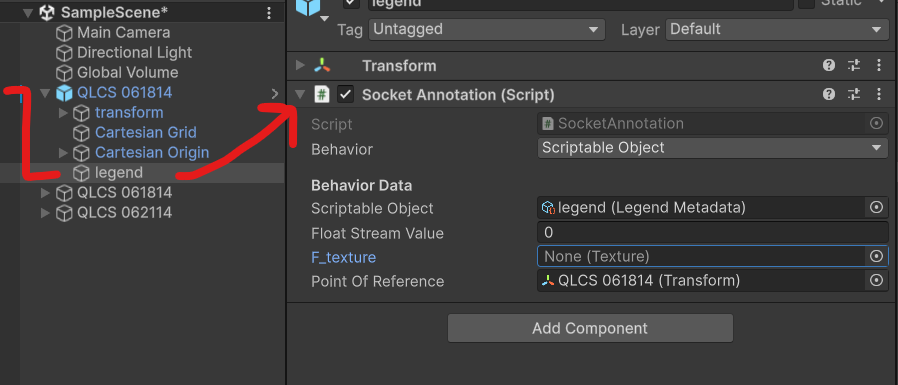
To add a socket annotation to your mod, create an empty transform inside your mod prefab, and attach a Socket Annotation component to it. Configure this component with your desired socket data.
At runtime, a data provider socket will be spawned on the prefab at the location of the Transform. If you need multiple socket annotations, it is recommended to place them all on separate transforms as siblings that are spaced apart, so users can easily choose which one to link.
Texture Data Type
You can reference both 2D and 3D textures in a socket annotation. This texture reference can be animated using an Animator component and the Playback System.
Optionally specify a “Point of Reference” Transform to give a reference of where 3D texture data is located within your prefab.
ScriptableObject Data Types
ScriptableObjects can contain complex data structures for providing in your socket that can’t otherwise be provided. A few types are provided.
Legend Metadata
Legend Metadata can be used to output legend information about a visualization, which can connected to the built-in Legend prefab. This allows the legend to be handled and moved independently from the dataset, allowing mod makers to focus on the visualization itself.
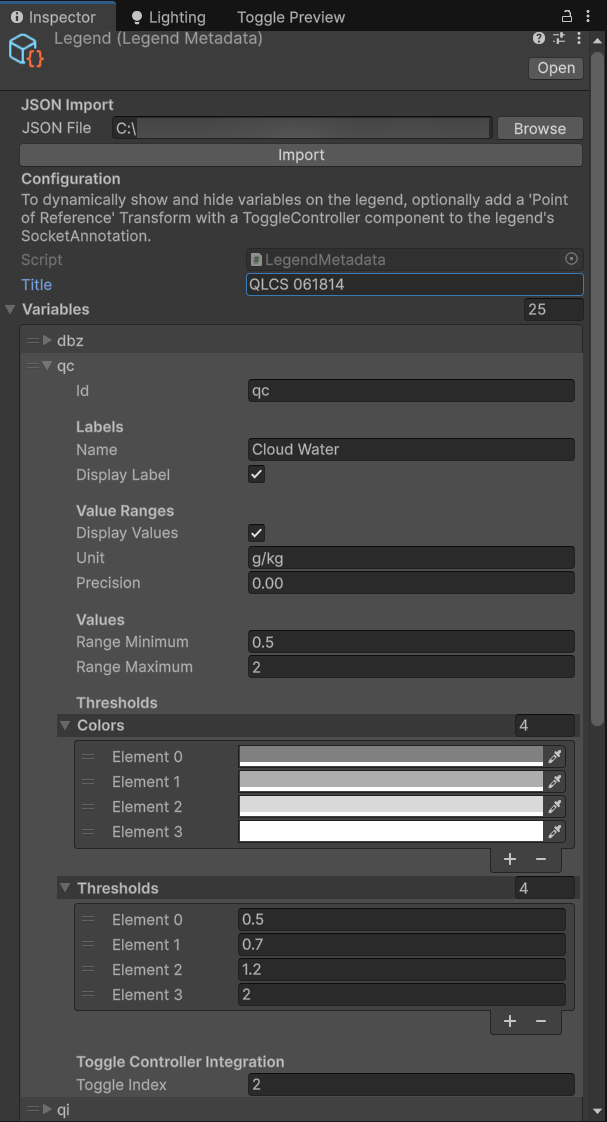
Because creating and maintaining these annotations can be a very time-consuming process for large datasets, we heavily recommend generating these automatically in your visualization pipeline. For this reason, the Legend Metadata class supports optionally loading from JSON files.
{
    "variables": [
        {
            "colorsHex": ["#808080", "#ADADAD", "#D9D9D9", "#FFFFFF"],
            "displayLabel": true,
            "displayValues": true,
            "enabled": false,
            "id": "qc",
            "name": "Cloud Water Mixing Ratio",
            "rangeMaximum": 2.0,
            "rangeMinimum": 0.5,
            "thresholds": [0.5, 0.7, 1.2, 2.0],
            "unit": "g/kg"
        },
        {
            "colorsHex": ["#3B392C", "#7A753D", "#BAAF2F", "#FAE500"],
            "displayLabel": true,
            "displayValues": true,
            "enabled": false,
            "id": "zvort_pos",
            "name": "Z Vorticity (+)",
            "rangeMaximum": 0.025,
            "rangeMinimum": 0.01,
            "thresholds": [0.01, 0.015, 0.02, 0.025],
            "unit": "s^-1"
        }
    ]
}
Note
See the Legend Metadata.Variable struct to see the full JSON schema.
…or you can set up your own Editor Script for a custom pipeline.
using UnityEditor;
using System.IO;
using CollabXR.ModExtras.Measurement;

// Import legend metadata
LegendMetadata legend = ScriptableObject.CreateInstance<LegendMetadata>();
legend.importFrom = meta.legendJsonPath;
legend.title = meta.title;
string legendJsonText = File.ReadAllText(legend.importFrom);
legend.LoadFromString(legendJsonText); // Automatically fill out legend

// ...make changes to legend as necessary

// Delete old Legend to avoid conflicts
AssetDatabase.DeleteAsset(Path.Join(meta.directory, "legend.asset"));

// Save legend to filesystem
AssetDatabase.CreateAsset(legend, Path.Join("Assets", meta.directory, "legend.asset"));
Toggle Controller Integration for Legends
Legends can hook into Toggle Controllers to only show certain variables when they are toggled on. To do this, set the “Point of Reference” on the socket annotation to the Transform that has your Toggle Controller component. Then set the “Toggle Index” field on each Legend variable to match the corresponding index of the Togglable Child in the Toggle Controller list.